One-page ya multi-page website: content ke hisaab se kaise choose karein?
Pages ki ginti se pehle visitor ke sawaal samjhein. Focused offer aur detailed services ke examples se website structure choose karne ka LayoutMint guide.
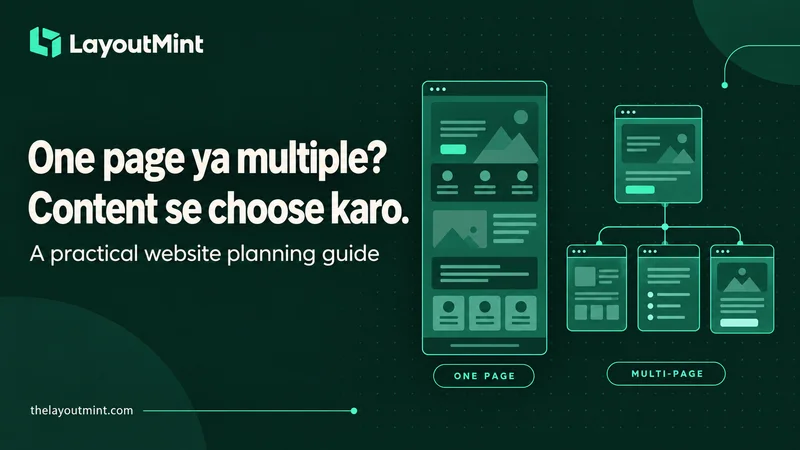
Website plan karte waqt aksar pehla sawaal hota hai: kitne pages banenge? Thoda pehle wala sawaal zyada useful hai: visitor ko kya samajhna hai aur uske baad kya karna hai? Ek hi page kuch projects ke liye sensible ho sakta hai. Dusre project mein wahi approach saari information ko ek lambi scroll mein daba deti hai. LayoutMint par design shortlist karne se pehle apna content map bana lein.
Ek focused offer ko kitni explanation chahiye?
Maan lijiye aap ek workshop ke liye landing page bana rahe hain. Topic, audience, date, venue, agenda aur registration ka next step ek logical sequence mein explain ho sakta hai. Agar ek hi main offer hai aur related details limited hain, one-page structure practical starting point ho sakta hai.
Iska matlab yeh nahi ki legal, contact ya supporting information ko force karke usi page mein bharna hai. Apne actual requirements review karein. One-page marketing layout aur poori website ke saare obligations ko ek cheez na samjhein.
Alag services ko alag context kab chahiye?
Ab ek agency ka example lein jo branding, website design aur ongoing content services deti hai. Har service ka audience, deliverables aur process alag ho sakta hai. Sirf teen short cards visitor ke important questions cover nahi karte. Dedicated service pages se relevant information ko clearly group kiya ja sakta hai.
LayoutMint ki collection mein different page structures milte hain. Product title ya hero image dekhkar choice final karne ke bajaye included pages aur detail-page examples dekhein. Extra pages tab useful hain jab unke paas meaningful, distinct content ho.
Apna content map plain language mein likhein
Ek rough list banayein: hum kya karte hain, kis ke liye karte hain, kaunse questions repeat hote hain, kaunsa real work dikhana hai aur next step kya hai. Phir related items group karein. Kisi group ko properly samjhane ke liye multiple sections lag rahe hain, toh uske liye separate page consider karein.
Example: cleaning business ki general introduction homepage par ho sakti hai. Agar home cleaning aur office cleaning ka scope, preparation aur enquiry requirements kaafi different hain, separate service pages more understandable ho sakte hain. Yeh illustrative example hai, har business ke liye fixed rule nahi.
Navigation aur maintenance ko bhi choice mein rakhein
Multi-page site mein menus, internal links aur repeated details ko maintain karna padta hai. One-page site mein section order, long-page reading aur anchor navigation ko carefully check karna hota hai. Dono formats ko phone par preview karein. Content update karne wali team ko bhi samajh aana chahiye ki change kahan hoga.
Sirf one-page ya multi-page hone se better search visibility, more enquiries ya higher sales assume na karein. Content, implementation aur actual business needs bhi matter karte hain; page count apne aap outcome ki guarantee nahi hai.
Template ko apne plan se match karein
LayoutMint par shortlist banate waqt apna content map side mein rakhein. Dekhein ki required page types included hain, files editable hain aur extra work kitna bachega. Aap template ka sample business copy nahi kharid rahe; apne business ke liye starting layout choose kar rahe hain.
LayoutMint templates explore karein aur apne content ke saath unka structure compare karein.